

Think of your law firm’s website as its digital front door. If that door only has stairs and no ramp, you’re turning away potential clients who use a wheelchair. An inaccessible website does the exact same thing online, creating an impossible barrier for people with vision, hearing, motor, or cognitive disabilities.
At its heart, that’s what ADA compliance for websites is all about: equal access.
What Is Website ADA Compliance in Simple Terms
The Americans with Disabilities Act (ADA) became law in 1990 to prevent discrimination. While its authors couldn't have imagined today's internet, federal courts have consistently ruled that its principles apply just as much to websites as they do to brick-and-mortar buildings.
This means your website needs to be designed and coded so that people using assistive tools, like screen readers for the visually impaired, can understand and navigate your content just as easily as anyone else.
The ADA and Places of Public Accommodation
Under Title III of the ADA, businesses open to the public are considered "places of public accommodation." This is the legal hook. Courts have repeatedly decided that commercial websites, including your law firm's site, fit this definition perfectly.
The catch? The ADA itself is a civil rights law, not a technical manual. It tells you what you need to do (provide equal access) but doesn't spell out how to do it online. That’s where a different set of guidelines comes in.
Following WCAG to Achieve Compliance
To bridge that technical gap, the entire web looks to the Web Content Accessibility Guidelines (WCAG). These are the globally accepted standards for digital accessibility, created by the World Wide Web Consortium (W3C).
Following WCAG is the universally recognized way to meet your legal obligations under the ADA.
The problem is, almost nobody is doing it. A shocking 96% of websites fail to meet basic compliance standards, leaving them wide open to lawsuits and alienating a huge pool of potential clients. The WebAIM Million report, which analyzed one million homepages, found that 94.8% had detectable WCAG 2 failures. The gap is massive.
Key Takeaway: The ADA is the law, and WCAG is the technical roadmap. For a law firm, achieving conformance with WCAG 2.1 Level AA is the gold standard for minimizing legal risk and ensuring your digital front door is open to everyone.
The best way to get there is to build accessibility in from the start, not try to tack it on later. For a deeper look at the specific rules, this guide on ADA website compliance requirements is a great resource. We make this a core part of our process, integrating it into every aspect of our SEO-first, ADA-compliant web design.
Let's be blunt. For a law firm, the conversation around web accessibility isn't just about good intentions—it's about risk. An inaccessible website is more than a missed opportunity; it's an open invitation for a lawsuit that can cost your firm dearly in both real dollars and reputation.
The legal hammer behind these lawsuits is Title III of the Americans with Disabilities Act (ADA). While the ADA was written in 1990, long before the internet became a part of daily life, federal courts have consistently ruled that commercial websites are "places of public accommodation." This precedent effectively turns your firm’s digital front door into a legally regulated space, just like your physical office.
This isn’t some abstract legal theory. It's the engine driving thousands of federal lawsuits every single year, and the numbers are climbing dramatically. The trend is undeniable—legal pressure on businesses for web accessibility is ramping up, as you can see from the latest data on web accessibility lawsuits.
The Anatomy of an ADA Lawsuit
Most of these disputes don't start with a bang in a courtroom. They begin quietly, with a demand letter landing in your inbox. These letters come from plaintiffs' attorneys, claiming that their client, an individual with a disability, was unable to access your site's information or services due to specific barriers.
The letter immediately puts you on the defensive, laying out the alleged violations and demanding a swift resolution. That usually includes:
- A monetary settlement, often in the $5,000 to $20,000 range.
- A legally binding promise to fix the website according to WCAG standards.
- Full payment of the plaintiff's attorney fees.
For most firms, settling is a simple business calculation. The cost of fighting a lawsuit, even a weak one, can easily eclipse the settlement demand. This unfortunate reality has spawned a cottage industry of "serial plaintiffs" who systematically hunt for non-compliant sites and fire off demand letters by the dozen.
The Financial and Reputational Toll
The settlement is just the beginning. A non-compliant website exposes your firm to a whole host of costs that go far beyond a single check.
The financial fallout is layered:
- Settlement Payouts: The immediate cost to make the problem "go away."
- Legal Fees: The bill for your own defense counsel, which can balloon if you decide to fight.
- Remediation Costs: You're still on the hook for auditing and overhauling your website, which is a significant project in itself.
- Increased Insurance Premiums: A history of ADA claims can make your business liability insurance more expensive.
But for a law firm, the damage to your reputation can be far worse. Being on the receiving end of a discrimination lawsuit torpedoes the very principles of justice and fairness your firm is supposed to represent.
An ADA lawsuit publicly broadcasts that your firm failed to provide equal access. This can alienate clients, burn bridges with referral sources, and even turn away talented attorneys who want to work for an inclusive practice.
Why Every Law Firm Is a Target
It doesn't matter what kind of law you practice. Whether you're a PI firm fighting for the injured, a corporate group advising businesses, or an estate planning attorney helping families, your website is your public face. The risk isn't tied to your specialty; it's tied to your digital presence.
Landmark court rulings have set a powerful precedent, making it progressively easier for plaintiffs to win these cases. While some nuances exist between federal circuits, the overwhelming trend is clear: businesses are being held accountable for their digital accessibility. Ignoring this reality isn't a strategy—it's a gamble with increasingly poor odds.
Understanding WCAG Levels A, AA, and AAA
While the Americans with Disabilities Act lays down the legal "why" for making your website accessible, it's short on the technical "how." For that, we turn to the Web Content Accessibility Guidelines (WCAG).
Think of WCAG as the official building code for the digital world. It provides the specific, actionable standards needed to build a website that everyone can use.
These internationally recognized guidelines are organized into three tiers of conformance: A, AA, and AAA. Each level builds on the one before it, creating a ladder of increasing accessibility. For a law firm, knowing the difference isn't just a technical detail—it's central to managing your legal risk.
Level A: The Bare Minimum
Level A represents the most basic, foundational layer of web accessibility. It’s designed to knock down the most common and severe barriers for users with disabilities.
Meeting these standards is non-negotiable, but stopping here is like getting the foundation of a building poured and calling it a day. It’s a start, but the structure is nowhere near ready for people.
For a law firm's site, Level A basics include things like:
- Adding text alternatives (alt text) to images so screen readers can describe them.
- Ensuring videos have captions.
- Making sure the entire site works with just a keyboard.
These are essential first steps, but they barely scratch the surface. A website that only meets Level A standards is still highly vulnerable to a lawsuit.
Level AA: The De Facto Legal Standard
This is the one that matters most. Level AA is the accepted industry and legal benchmark for accessibility.
When the Department of Justice (DOJ) gets involved, or when courts rule on website accessibility lawsuits, this is the standard they consistently point to.
If Level A is the foundation, Level AA is the fully constructed, code-compliant office building. It has ramps, accessible restrooms, and clear signage. It’s safe, functional, and provides meaningful access to everyone who enters. For your law firm's website, hitting Level AA means you've implemented more sophisticated and crucial features.
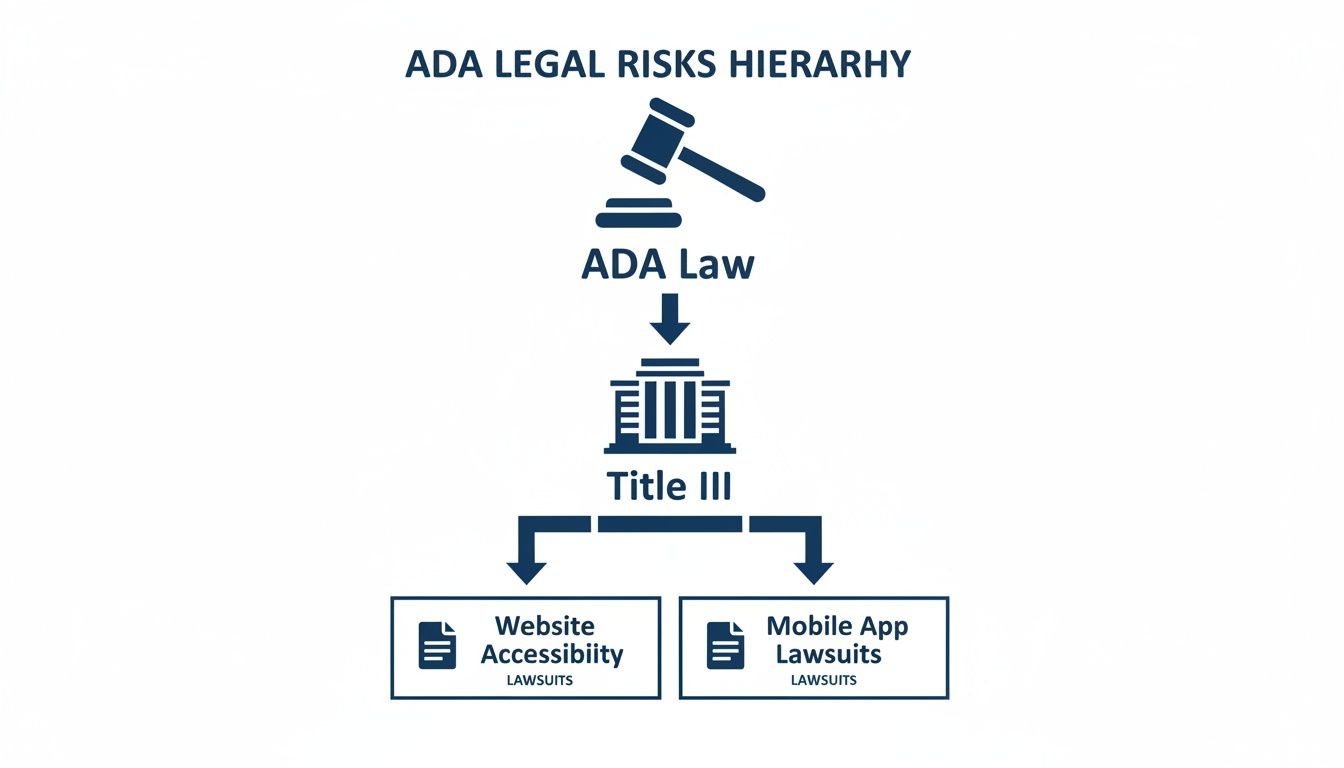
As you can see, the broad mandate of the ADA flows directly down through Title III, making website accessibility a primary driver of litigation.
Key Level AA criteria include:
- Color Contrast: Text must stand out clearly from its background, making it readable for people with vision impairments. Light gray text on a white background is a common failure.
- Text Resizing: Users need to be able to zoom in and increase text size up to 200% without the page breaking or losing functionality.
- Consistent Navigation: Your main menu and key links should be in the same place and order on every single page.
- Clear Error Messages: If someone fills out your contact form incorrectly, the site must clearly flag the error and explain how to fix it in plain text.
Key Insight: For any law firm serious about avoiding litigation, WCAG 2.1 Level AA is the target. It strikes the right balance between robust accessibility and modern design, and it’s the standard you’ll be judged against in court.
Getting this right requires a plan from day one of the design process, which is something we cover in our guide to law firm website design tips.
Level AAA: The Highest Standard
Finally, there’s Level AAA, the most stringent and highest level of web accessibility. This standard is typically reserved for specialized websites serving specific disabled communities.
Think of it as a state-of-the-art hospital wing, engineered with advanced features that go far beyond what a typical public building requires.
Achieving full Level AAA conformance across an entire law firm website is neither required nor, in many cases, practical. Some of its strict criteria can even make the site harder to use for the general public.
Below is a quick breakdown of what these levels mean in practice.
WCAG Conformance Levels Explained
| Conformance Level | What It Means | Example for a Law Firm Website |
|---|---|---|
| Level A | The Foundation. Addresses the most critical accessibility barriers. Non-negotiable but insufficient on its own. | Your "Case Results" page has alt text for attorney photos so a blind user knows who is pictured. |
| Level AA | The Legal Standard. The widely accepted target for compliance, cited in court cases and settlements. | The phone number in your header has high color contrast against the background, making it easy to read. |
| Level AAA | The Gold Standard. Highest level of accessibility, often for specialized audiences. Not typically required for law firms. | You provide a sign language interpretation video for every testimonial video on your website. |
While aiming for some Level AAA principles is a great goal, your firm's resources are best spent achieving and maintaining rock-solid Level AA conformance. That's the standard that protects you from litigation and ensures your digital front door is truly open to every potential client.
An Actionable ADA Compliance Checklist For Your Firm
Knowing the legalese and the WCAG standards is one thing, but actually putting those principles into practice is what keeps your firm safe. This checklist isn't some technical to-do list; it's a proactive risk management strategy. Every item here addresses a common barrier that could stop a potential client from reaching you and, in turn, spark a demand letter.
Think of this as the digital version of making sure your office hallways are clear and your entrances have ramps. By focusing on these core WCAG Level AA success criteria, you can start hunting down and fixing the most critical issues on your firm's website.
Foundational User Experience
First things first: can everyone even use the basic functions of your site? This is all about setting a baseline that assistive technologies can understand and work with.
-
Keyboard-Only Navigation: Can you get to every single part of your website using only the "Tab" key to move forward, "Shift+Tab" to go back, and "Enter" to click? Many people with motor disabilities can't use a mouse, so every link, button, and form field has to work this way. No exceptions.
-
Logical Focus Order: As you tab through the site, does the little highlight box (the "focus") move in a way that makes sense? It should follow the visual layout—usually top to bottom, left to right. If it jumps around randomly, users get lost and frustrated.
-
Skip Navigation Links: Imagine having to listen to the same menu read aloud on every single page. It's tedious. A "Skip to Main Content" link at the very top of the page (it can be hidden until someone tabs to it) is a lifesaver for screen reader users, letting them jump right to what they came for.
Content and Media Accessibility
Your firm’s content—from attorney bios to explainer videos—is your single most important asset. Making it accessible means ensuring every bit of that information can be understood by anyone, no matter their abilities.
An inaccessible video or image isn't just a design flaw; it's a closed door. To a client with a hearing or vision impairment, it signals that your services are not for them, which is the exact basis for many ADA lawsuits.
Alt Text for All Informative Images: Every image that actually conveys information needs descriptive alternative text (alt text). For an attorney's photo, bad alt text is "image123.jpg." Good alt text is "Attorney Jane Doe, headshot." Screen readers announce this description out loud, giving vital context to visually impaired users.
Captions for Video Content: Any video you post must have accurate, synchronized captions. This is non-negotiable for users who are deaf or hard of hearing, and it’s also a huge benefit to people in noisy offices or those who just prefer to read along.
Transcripts for Audio: If you host a podcast or have other audio-only clips, you need to provide a full text transcript. It’s the only way to give people with hearing impairments equal access to that information.
Design and Presentation Clarity
A clean, readable design is the bedrock of accessibility. These checks are all about how your visual choices can either help someone understand your site or create a massive roadblock. Getting this right not only helps users with disabilities but improves the experience for everyone, which is a key part of learning how to improve your law firm's website.
-
Sufficient Color Contrast: Text has to stand out clearly from its background. Light gray text on a white background is a classic mistake and a huge problem for users with low vision or color blindness. Use a free contrast checker tool to make sure your firm’s brand colors pass the test.
-
Readable Text and Sizing: People need to be able to zoom in on your text up to 200% without the page breaking or words overlapping. You should also avoid justifying text, which can create distracting "rivers of white" space that make reading difficult for users with dyslexia.
Forms and Interactive Elements
Your contact forms are the finish line. They’re how potential clients turn into actual clients. If those forms are broken for users with disabilities, you are literally turning away business and inviting legal trouble.
-
Clearly Labeled Fields: Every single box in your form (like "Name," "Email," "Phone") must have a label that's programmatically linked to it. This is how a screen reader knows what to tell the user to type in each box. Placeholder text inside the field is not a substitute.
-
Accessible Error Messages: When a user messes something up, the error needs to be announced clearly. The message should say exactly what went wrong (e.g., "Please enter a valid email address") and guide the user back to the specific field that needs to be fixed.
-
No Time Limits (or Adjustable Ones): If anything on your site is timed, like a session that logs you out, you must give the user a way to turn it off or ask for more time. This is critical for users who need more time to read, type, and process information.
For an even deeper dive, Bruce and Eddy offer an excellent ultimate website accessibility checklist that can really round out your internal audit. Working through these items one by one is the single best way to lower your risk and build a more inclusive digital front door for your firm.
Common Accessibility Mistakes Law Firms Make
Knowing the rules of ADA compliance is one thing. Knowing where firms most often get it wrong is another. The reality is, many well-meaning law firms fall into the same traps, creating legal exposure with simple, avoidable errors.
These aren't hidden technical landmines. They are common, easy-to-spot issues that plaintiffs' attorneys specifically hunt for when looking for their next target. Understanding these pitfalls is your first practical step toward a more defensible—and genuinely inclusive—digital front door.
Relying on Automated "Overlay" Widgets
This is probably the single biggest mistake a law firm can make. You see an ad for an accessibility "overlay" or "widget" that promises a cheap, one-click fix. You install it and assume the problem is solved. It isn't.
These tools add a superficial layer of code over your site, but they almost never fix the core accessibility problems baked into its structure. Worse, their presence has become a giant red flag for plaintiffs. It signals that a business went for a quick fix instead of doing the real work. Hundreds of lawsuits have been filed against companies using these widgets, making them a massive liability, not a solution.
Publishing Inaccessible PDF Documents
Law firms run on documents. Think about all the PDFs on your site: case studies, attorney bios, intake forms, and legal articles. If these files aren't built to be accessible, they’re just digital brick walls.
To a screen reader, an inaccessible PDF is just a picture of text. The user can’t read the content, jump between sections using headings, or fill out form fields. This effectively locks a huge audience out of crucial information and makes it impossible for them to become a client.
Key Takeaway: Every single document you upload, from a two-page brochure to a detailed whitepaper, must be accessible. Forgetting to fix your PDFs leaves a gaping hole in your compliance that’s incredibly easy for plaintiffs to find.
Poor Design Choices That Create Barriers
Sometimes, the biggest problems are hiding in plain sight within your website's fundamental design. These are issues your marketing team might never notice, but for users with disabilities, they make your site unusable.
Here are some of the most common offenders:
- Low Color Contrast: That light gray text on a white background might look sleek, but for someone with low vision, it’s completely unreadable. The same goes for text slapped over a busy background image.
- Vague Link Text: Links labeled "Click Here" or "Learn More" are meaningless to a screen reader user, who often navigates by tabbing through a list of links. The text must describe the destination, like "Download Our Estate Planning Guide."
- Complex Navigation: A confusing menu that’s impossible to operate with a keyboard prevents users from finding what they need. If they can't get to your contact page, they can't hire you.
These aren’t just technical violations of WCAG; they create a frustrating experience that sends potential clients straight to your competitors. A core part of any legitimate web design for an attorney project involves fixing these foundational issues from the ground up.
With thousands of ADA lawsuits hitting federal courts every year, this is not a theoretical risk. The trend is growing nationwide, far beyond traditional hubs like New York and Florida, as detailed in recent reports on ADA website lawsuit trends. A proper, code-level approach isn’t just a best practice—it’s the only way to genuinely protect your firm.
It’s easy to look at ADA compliance as just another legal hurdle—a defensive move to avoid getting sued. But that’s a narrow, and frankly, a losing perspective. It treats accessibility like a chore, a cost you have to absorb.
The smart move is to flip the script entirely. An accessible website isn't an expense; it's a powerful investment in your law firm's growth, reputation, and competitive edge.
The most obvious win is expanding your market. Think about this: roughly one in four adults in the U.S. lives with some form of disability. If your website is inaccessible, you’ve basically slammed the door on 25% of the population. By building a site everyone can use, you instantly broaden your potential client base and tap into a huge market segment your competitors are likely ignoring.
Build Trust and Sharpen Your Brand
Beyond the raw numbers, an accessible website says something powerful about your firm's character. It's a tangible demonstration that you're committed to inclusivity and equal access—the very principles at the heart of the legal profession. In a sea of look-alike law firms, that kind of commitment is a serious differentiator.
This isn’t just about appealing to people with disabilities. It signals to every potential client that your firm is thoughtful, modern, and genuinely dedicated to serving the entire community. That’s how you build trust and a brand that people remember.
The Overlooked SEO Advantage
Here’s something that surprises most attorneys: accessibility and search engine optimization (SEO) go hand-in-hand. Google’s entire goal is to show users the most relevant, helpful, and easy-to-use websites. It just so happens that the very same practices that make a website work for assistive technologies also make it a dream for search engine crawlers.
A well-structured, accessible website is inherently easier for search engines to understand and rank. The technical work required for compliance directly supports your firm's visibility in search results, creating a win-win scenario.
Look at how neatly ADA best practices overlap with a solid SEO strategy:
- Descriptive Alt Text: Adding alt text to your images is essential for visually impaired users. It also gives search engines critical context about what those images are, helping you rank in image search.
- Logical Heading Structure: Using headings (H1, H2, H3) correctly creates a clean outline for screen readers. It also gives Google a perfect roadmap to understand the topics and hierarchy of your content.
- Video Transcripts: Transcripts make your videos accessible to users with hearing impairments. They also give search engines a fully crawlable text version of your video content, which can be a massive boost for your rankings.
At the end of the day, investing in website accessibility pays dividends far beyond just dodging a lawsuit. It grows your pool of potential clients, strengthens your brand, and directly fuels more effective strategies for lead generation for lawyers. It’s not a defensive cost—it's a proactive business decision that sets your firm up for real, sustainable growth.
Answering Your ADA Compliance Questions
When we talk with law firms about website accessibility, the same practical questions come up time and time again. Let’s cut through the noise and get straight to the answers you need.
Is ADA Compliance Really a Legal Requirement for My Website?
Yes, for all intents and purposes, it is.
While the original ADA text from 1990 doesn't mention websites, federal courts have consistently interpreted commercial websites—like your law firm's—as "places of public accommodation" under Title III. The Department of Justice stands by this interpretation.
This means your firm’s website must be accessible. Ignoring this puts you at direct and significant risk of getting hit with an expensive, time-consuming lawsuit.
Can't I Just Install an Accessibility Plugin and Be Done With It?
That’s a high-risk gamble, and we strongly advise against it. Simply slapping an accessibility widget or plugin onto your site almost never works.
These tools often fail to fix the deep, code-level issues that cause inaccessibility in the first place. In fact, hundreds of lawsuits have specifically named companies that were using these exact plugins. They provide a false sense of security while leaving your firm completely exposed.
Key Insight: True compliance isn't about a temporary overlay. It's about fixing the underlying code of your website. A superficial plugin is like putting a band-aid on a broken bone—it doesn't solve the root problem.
What's the Difference Between ADA and WCAG?
This is a great question. Think of it like this: the ADA is the law that says what you need to do (make your services accessible), while the WCAG is the technical manual that explains how to do it online.
The Americans with Disabilities Act (ADA) is the civil rights law. The Web Content Accessibility Guidelines (WCAG) are the globally recognized standards for digital accessibility. To meet your legal obligations under the ADA, your website needs to conform to WCAG 2.1 Level AA.
A truly accessible website isn't just about avoiding lawsuits—it's about opening your firm's doors to every potential client. At Case Quota, we build ADA compliance into the foundation of every website we design, ensuring you are protected, inclusive, and positioned for growth. See our approach at https://casequota.com.