

In today’s competitive legal market, your firm’s website is no longer a digital brochure; it’s your 24/7 rainmaker. A potential client’s first interaction with your firm is often through their screen, forming a crucial impression long before they ever speak to an attorney. Yet, many law firm websites fail to convert visitors into clients due to outdated design, poor user experience, or a lack of clear, persuasive messaging. These underperforming sites leak potential cases daily without anyone even realizing the lost opportunity.
This guide moves beyond generic advice to provide a strategic roadmap for building a site that actively works for you. We will deliver eight critical and actionable law firm website design tips that cover everything from establishing immediate trust to ensuring your site is accessible and fast on any device.
You’ll learn how to implement clear calls-to-action, optimize your practice area pages for local search, and integrate features that make it easy for potential clients to connect. Our goal is to equip you with the specific insights needed to transform your website from a simple online presence into a powerful engine for generating qualified leads and driving your firm’s growth.
1. Build Immediate Trust with Professional Credibility Markers
A law firm’s website must instantly establish trust. Unlike a typical business, potential clients visiting your site are often in a state of high stress and vulnerability. Your design’s first job is to reassure them that they have found a stable, expert, and reliable advocate. This is accomplished by strategically placing credibility markers throughout your site, especially above the fold on your homepage.
These markers are visual and textual proof of your qualifications, success, and professional standing. They are not just decorations; they are foundational trust signals that validate a client’s decision to reach out. Think of your website’s homepage as a digital antechamber. It must immediately communicate competence and calm a visitor’s anxieties. This is one of the most crucial law firm website design tips because without trust, even the most compelling call-to-action will fail.
How to Implement Credibility Markers
Integrate these elements prominently, but tastefully, into your design. The goal is to build confidence without appearing boastful.
- Awards and Recognitions: Place logos from reputable organizations like Super Lawyers, Martindale-Hubbell, or Best Lawyers in a dedicated “As Seen In” or “Recognitions” banner.
- Bar Association Memberships: Display logos of the state and local bar associations you belong to. For a Southern California firm, this could include the State Bar of California, Los Angeles County Bar Association, or Orange County Bar Association.
- Authentic Testimonials: Move beyond a simple testimonials page. Integrate short, powerful quotes from real clients directly on your homepage and relevant practice area pages. Including a client’s photo (with permission) adds significant weight.
- Verifiable Case Results: Showcase significant case wins or settlements. Frame them with context, like “Multi-Million Dollar Settlement for Car Accident Victim” or “Not Guilty Verdict in Complex Criminal Defense Case.” Avoid jargon and focus on the life-changing outcome for the client.
- Professional Photography: Use high-quality, professional headshots of your attorneys and photos of your actual office. Generic stock photos create an immediate sense of distrust and undermine your firm’s authenticity.
Pro Tip: When placing award logos, use the official, high-resolution versions. A pixelated or distorted logo can make your entire site look unprofessional, defeating the purpose of showcasing the credential in the first place.
2. Implement a Mobile-First Responsive Design
A modern law firm’s website must be designed for the screen where most clients will first see it: their smartphone. With over 60% of legal service searches happening on mobile devices, a desktop-centric design is no longer viable. A mobile-first approach means designing the user experience for the smallest screen first and then scaling it up for tablets and desktops. This ensures the mobile experience is seamless and optimized, not just a shrunken-down afterthought of the desktop site.
This strategy is one of the most critical law firm website design tips because it directly impacts a potential client’s first impression and ability to take action. When someone is searching for legal help on their phone, they need information and a way to contact you immediately. A clunky, hard-to-navigate mobile site creates frustration and will drive them directly to a competitor whose site works flawlessly on their device.
The following infographic highlights key statistics that underscore the importance of a mobile-first design strategy for law firms.
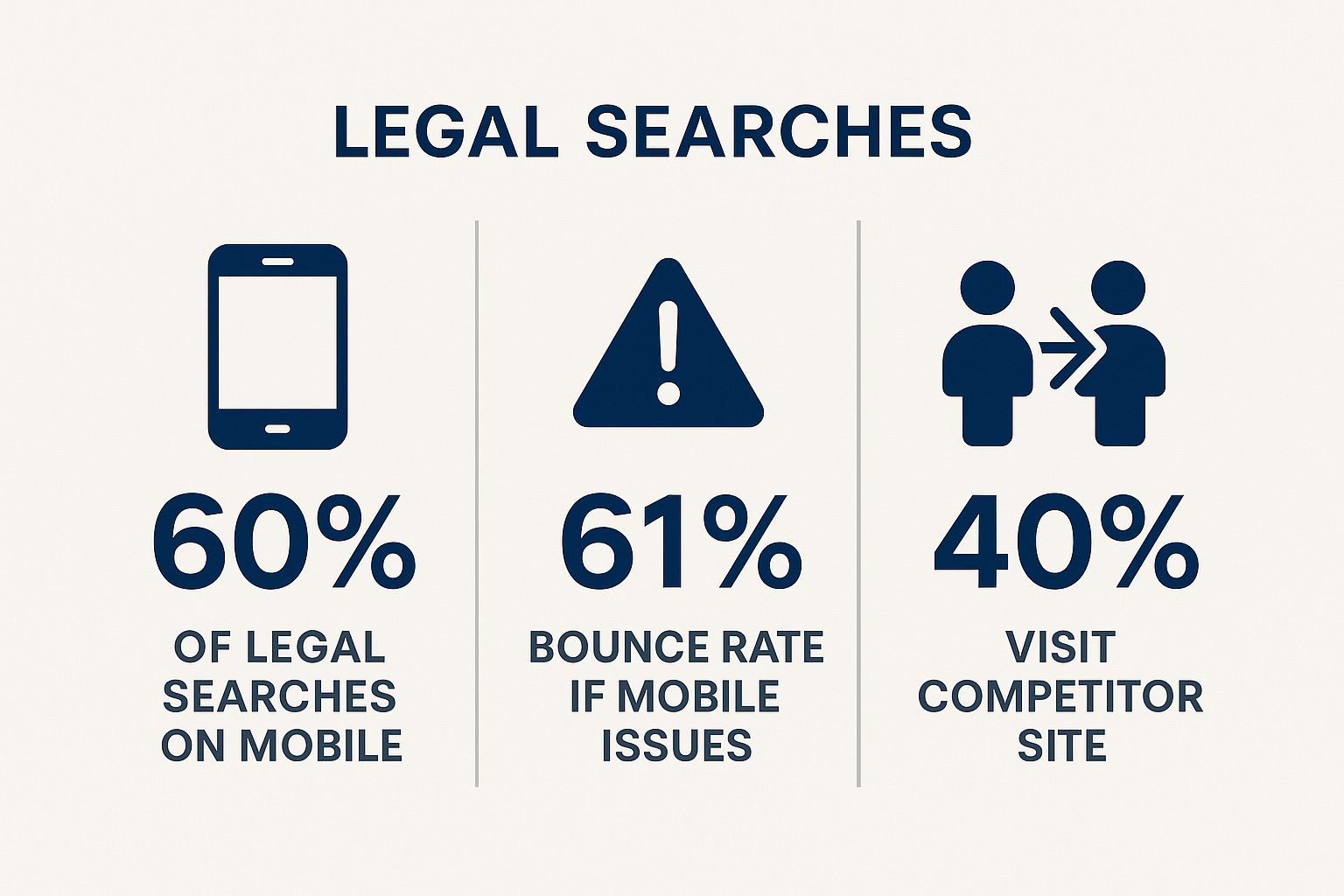
These numbers clearly show that a poor mobile experience not only loses a potential lead but actively sends them to your competition.
How to Implement a Mobile-First Design
Prioritize speed, clarity, and ease of contact for the mobile user. The goal is to remove all friction between a visitor’s legal need and their ability to contact your firm.
- Prioritize Touch-Friendly Navigation: Use large, easily tappable buttons and menu items. Ensure there is enough space between clickable elements to avoid accidental taps, a common frustration on smaller screens.
- Implement “Click-to-Call” Functionality: Make your phone number a clickable link in a fixed header or footer that stays visible as the user scrolls. This allows a potential client in Southern California to call your Los Angeles or Irvine office with a single tap.
- Simplify Forms: Keep contact forms short and simple. Ask only for essential information like name, email, phone, and a brief message. Complicated, multi-field forms are a major deterrent on mobile devices.
- Optimize for Speed: Mobile users expect fast loading times. Compress images, leverage browser caching, and minimize code to ensure your pages load in under three seconds on a mobile network.
- Use a Vertical Layout: Structure content in a single, scrollable column. Stacking content vertically is the most natural way for users to consume information on a phone, avoiding the need for horizontal scrolling.
Pro Tip: Test your website on actual physical devices, not just on a desktop browser’s mobile simulator. Simulators are useful but cannot fully replicate the user experience, performance, and touch-responsiveness of real iPhones and Android devices.
3. Clear Call-to-Action (CTA) Strategy Throughout the Site
A well-designed law firm website does more than just inform; it guides visitors toward a specific, desired action. This is achieved with a clear and compelling call-to-action (CTA) strategy. Potential clients are on your site because they need immediate help, and your design’s job is to make it incredibly simple for them to take the next step. A CTA is a direct instruction, like “Schedule a Free Consultation” or “Call Us Now,” designed to prompt an immediate response.

Without prominent CTAs, a visitor might read about your services, feel impressed, and then leave without ever making contact. An effective CTA strategy removes friction from the conversion process, turning passive visitors into active leads. This is one of the most vital law firm website design tips because it directly bridges the gap between a user’s need for legal help and their decision to hire your firm. Integrating a strong CTA strategy is fundamental to understanding how to get more clients for your law firm.
How to Implement a Strong CTA Strategy
Your CTAs should be strategically placed, visually distinct, and use action-oriented language that resonates with someone in a legal crisis. The goal is to make contacting you the easiest and most logical next step.
- Use Action-Oriented and Specific Language: Replace generic phrases like “Contact Us” with specific, value-driven commands. Use “Speak with a DUI Attorney Now” or “Get Your Free Case Review” to connect the action directly to the user’s need.
- Place CTAs Strategically: A CTA should appear in the header and footer of every page. Also, place them at the end of practice area pages, just after you have educated the visitor on how you can solve their problem.
- Create Visual Contrast: Your CTA buttons should stand out from the rest of your site’s color scheme. For instance, a firm like Foster & Foster effectively uses bright orange CTA buttons against their primary blue and white design to draw the user’s eye.
- Optimize for Mobile: Ensure your CTA buttons are large enough for easy tapping on mobile devices. The recommended minimum size is 44×44 pixels to avoid user frustration and accidental clicks.
- Use First-Person Language: A/B testing has shown that CTAs phrased in the first person can increase conversion rates. Try using “Start My Free Consultation” instead of “Start Your Free Consultation” to create a stronger sense of ownership for the user.
Pro Tip: For visitors who aren’t ready to commit to a full consultation, offer a “micro-commitment” CTA like “Download Our Free Guide to California Car Accidents” or “Learn More About the Process.” This keeps them engaged and captures their contact information for future follow-up.
4. Practice Area Pages with Specific, Localized Content
Potential clients are not looking for a generic overview of a legal field; they are seeking specific answers to their immediate, local problems. Creating dedicated, comprehensive pages for each practice area filled with localized content moves your website from a simple brochure to a vital resource. These pages should go beyond a surface-level description and delve into the nuances of practicing that law within your specific jurisdiction.
This approach is one of the most powerful law firm website design tips because it serves two critical functions. First, it demonstrates deep expertise and builds trust by showing clients you understand their unique situation, from the local court procedures in Orange County to specific California state statutes. Second, it dramatically improves your SEO performance by targeting the long-tail keywords that high-intent prospects are actually using, like “DUI defense in Los Angeles” or “child custody laws in San Diego.”
How to Implement Specific, Localized Practice Pages
Transform your service pages from general outlines into authoritative local guides. The goal is to answer a potential client’s core question: “Why is this firm the right choice for my specific case in my area?”
- Address Local Laws and Procedures: Explain how California law or even a specific county ordinance impacts a client’s case. For example, a page on business litigation could discuss navigating the Los Angeles County Superior Court’s complex civil division.
- Answer Common Local Questions: Use an FAQ format to address questions you frequently hear from local clients. A personal injury page might answer, “What is the statute of limitations for a car accident claim in California?”
- Showcase Relevant Local Experience: Detail your firm’s track record with cases in the local area. Instead of just saying “Case Won,” say “Acquittal Secured in a Riverside County Criminal Court Case.”
- Integrate Local SEO Elements: Include the names of cities, counties, and local landmarks naturally within the text. Embed a Google Map showing your office location and service area on each practice page.
- Create Jurisdiction-Specific Resources: Offer a downloadable checklist for “Steps to Take After a Workplace Injury in Southern California” or a guide to the probate process in your specific county.
Pro Tip: Use schema markup (specifically the
LegalServicetype) on your practice area pages. This helps search engines understand the exact services you offer and the geographic areas you serve, which can lead to better visibility in local search results and rich snippets. Learn more about how to structure your practice area pages on casequota.com.
5. Fast Loading Speed and Technical Performance
A potential client in legal distress has zero patience for a slow-loading website. Website speed is a critical, non-negotiable component of modern law firm marketing because every second of delay directly translates to lost leads and a damaged reputation. A slow site not only frustrates users, causing them to leave before they ever see your contact information, but it also severely penalizes your search engine rankings, making you invisible to potential clients on Google.
Technical performance is about more than just speed; it’s about the underlying health and efficiency of your digital presence. Optimizing images, minimizing code, using efficient hosting, and leveraging modern web technologies are all essential. Prioritizing performance is one of the most impactful law firm website design tips because it respects a visitor’s time and urgency, immediately signaling that your firm is efficient, professional, and ready to act. For a deeper dive into how performance issues can make your firm invisible online, you can learn more about how a slow and unsecure website impacts your Google rankings on Caseuota.com.
How to Implement Performance Optimization
Building a fast website requires a deliberate, multi-faceted approach. Focus on these key areas to ensure your site is technically sound and loads quickly for every visitor.
- Benchmark and Monitor: Use free tools like Google PageSpeed Insights and GTmetrix to analyze your current site speed. Aim for a load time under 3 seconds, especially on mobile devices.
- Optimize Your Visuals: Large media files are the most common cause of slow websites. Compress all images before uploading them, aiming for file sizes under 100KB. Host videos on a third-party platform like YouTube or Vimeo instead of your own server.
- Streamline Your Codebase: An overloaded website is a slow website. Regularly remove unused plugins and scripts that bog down your server. Choose a modern, well-coded theme or framework designed for speed.
- Leverage Caching and CDNs: Implement browser caching so that repeat visitors’ browsers don’t have to reload the entire site. Use a Content Delivery Network (CDN) to distribute your site’s assets across global servers, ensuring fast load times for users no matter their location.
- Enable Server-Side Compression: Ensure GZIP compression is enabled on your hosting server. This simple technical step dramatically reduces the size of your site’s files before they are sent to a visitor’s browser.
Pro Tip: When auditing your plugins, deactivate and delete anything that is not absolutely essential to your site’s core functionality. Every active plugin adds code that must be loaded, and even a few unnecessary ones can collectively slow your site to a crawl.
6. Accessible and Intuitive Navigation Structure
A potential client arriving on your website is often looking for a specific answer under duress. A confusing navigation structure acts as an immediate barrier, causing frustration and leading them to abandon your site for a competitor’s. Your website’s navigation must be crystal clear and intuitive, guiding visitors effortlessly to the information they need, whether it’s a specific practice area, an attorney’s bio, or your contact details.
This principle extends beyond simple usability; it’s about creating a frictionless path from a visitor’s question to your firm’s solution. Excellent navigation keeps users engaged, reduces bounce rates, and signals to search engines that your site is a high-quality resource. Prioritizing this element is one of the most impactful law firm website design tips because it directly influences a user’s ability to take the crucial next step of contacting you. It also ensures people with disabilities can access your services, which is both an ethical and legal imperative.
How to Implement Intuitive Navigation
A logical and accessible menu system is the backbone of a positive user experience. The goal is to anticipate user needs and eliminate guesswork.
- Limit Top-Level Items: Keep your main navigation menu concise, ideally with 5 to 7 primary items. This prevents overwhelming the user. Common items include Home, About Us, Practice Areas, Attorneys, Blog/Resources, and Contact Us.
- Use Client-Focused Language: Avoid internal legal jargon. Instead of “Tort Litigation,” use clear, problem-oriented language like “Personal Injury” or “Car Accidents.” This speaks directly to the visitor’s situation.
- Organize Practice Areas Logically: If your firm handles many practice areas, group them logically under a single “Practice Areas” or “What We Do” dropdown. A well-organized mega menu, like that used by Gibson Dunn, can effectively manage extensive lists without clutter.
- Ensure Constant Contact Access: Your phone number should be prominently displayed in the header of every page, and a link to your contact page or form should always be visible in the main navigation. Don’t make potential clients hunt for a way to reach you.
- Prioritize Accessibility (WCAG): Design your navigation to be fully usable by individuals with disabilities. This includes implementing keyboard-only navigation, ensuring sufficient color contrast, and adding “skip to content” links for screen reader users. The Disability Rights Advocates website is an excellent example of this in practice.
Pro Tip: Test your navigation structure with people outside your firm. What seems intuitive to you and your staff, who are familiar with your services, may be confusing to a potential client. User feedback is invaluable for identifying and fixing points of friction.
7. Strategic Content Marketing with Valuable Legal Resources
A truly effective law firm website functions as more than just a digital brochure; it becomes an authoritative resource that educates and empowers potential clients. This is achieved through strategic content marketing, the practice of creating and distributing valuable, relevant, and consistent content to attract and retain a clearly defined audience. For law firms, this means moving beyond static service pages to offer a rich library of resources like blog posts, in-depth guides, and detailed FAQs.
This approach transforms your website from a sales pitch into a trusted advisor. When potential clients in Southern California are searching for answers to urgent legal questions, they are not looking for an advertisement. They are looking for expertise and clarity. Providing this value upfront establishes your firm as a thought leader and builds a foundation of trust before they ever pick up the phone. This is one of the most powerful law firm website design tips because it directly addresses the user’s intent and nurtures them from a passive searcher into a qualified lead.
How to Implement a Content Marketing Strategy
Focus on creating resources that answer the specific questions your ideal clients are asking. The goal is to be genuinely helpful, not just promotional.
- Answer Real Client Questions: Develop blog posts and FAQ sections based on the most common questions you hear during initial consultations. A personal injury firm in Los Angeles could create a guide titled, “What Are the First 5 Things to Do After a Car Accident on the I-405?”
- Create ‘Ultimate Guides’: For each core practice area, develop a comprehensive, long-form guide (3,000+ words) that covers a topic from start to finish. An estate planning attorney could create an “Ultimate Guide to Creating a Living Trust in California.”
- Use Keyword Research: Utilize tools like Ahrefs or SEMrush to discover the exact phrases and questions people are searching for related to your practice areas. Target these keywords to attract high-intent traffic.
- Incorporate Video Content: Explain complex legal topics through short, accessible videos. A criminal defense lawyer could create a video explaining the difference between a misdemeanor and a felony, embedding it directly into a relevant blog post. For more details on building a comprehensive plan, you can learn more about effective content marketing strategies for law firms.
- Keep Content Current: The law changes. Annually review and update your most popular articles and guides to ensure they remain accurate and relevant, which also helps maintain their search engine rankings.
Pro Tip: Within every piece of content, include clear and relevant calls-to-action (CTAs). A blog post about workers’ compensation benefits should end with a clear prompt like, “Confused About Your Claim? Schedule a Free, No-Obligation Consultation Today,” linking directly to your contact page.
8. Integrated Live Chat and Multiple Contact Options
In an era of instant communication, potential clients expect immediate and convenient ways to connect. A modern law firm website must cater to various communication preferences by offering multiple contact points. Relying solely on a phone number and a basic contact form can lead to lost opportunities, as some visitors may prefer the immediacy of chat, while others want the detail of an email. This is a critical component of effective law firm website design tips because it removes friction from the most important step: the initial inquiry.
Providing a suite of contact options demonstrates accessibility and a client-centric approach. Live chat, in particular, has become a powerful tool for capturing leads who are browsing your site in real-time but aren’t ready to commit to a phone call. By combining chat with prominent phone numbers, detailed forms, and direct email links, you create a comprehensive net to capture every potential client, regardless of their preferred communication style or sense of urgency.
How to Implement Multiple Contact Options
Strategically place various contact methods throughout your site to ensure a user is never more than one click away from reaching you. The goal is to make it as easy as possible for a visitor to take the next step.
- Offer 24/7 Live Chat: Implement a chat service like Smith.ai or Apex Chat, which specialize in legal intake. These can use AI-powered bots for initial questions and seamlessly transition to live agents, ensuring you capture leads even after business hours.
- Optimize Your Contact Forms: Use “smart” forms that reveal follow-up questions based on a user’s initial input. For example, a potential personal injury client in Southern California who selects “Car Accident” could see different questions than one who selects “Slip and Fall.”
- Make Phone Numbers Click-to-Call: Ensure every phone number on your site, especially in the header and footer, is a clickable link on mobile devices. This simple feature drastically improves the user experience for mobile visitors.
- Provide Direct Email Links: In addition to a contact form, include a direct, clickable email address (e.g.,
[email protected]). Some clients prefer using their own email client to have a record of the conversation. - Integrate with Your CRM: Connect your website forms and chat tools directly to your firm’s CRM, such as Clio or Lawmatics. This automates lead entry, preventing inquiries from falling through the cracks and enabling swift follow-up.
Pro Tip: Position your live chat widget in the bottom-right corner of the screen. This is the standard, expected location for users, and placing it elsewhere can cause confusion and reduce engagement. During off-hours, configure the widget to become a simple lead capture form.
8 Key Design Tips Comparison
| Feature / Aspect | Professional, Trust-Building Design ⭐🔄 | Mobile-First Responsive Design ⚡🔄 | Clear Call-to-Action (CTA) Strategy ⭐📊 | Practice Area Pages with Specific, Localized Content 💡📊 | Fast Loading Speed and Technical Performance ⚡📊 | Accessible and Intuitive Navigation Structure 💡🔄 |
|---|---|---|---|---|---|---|
| Implementation Complexity 🔄 | Moderate – requires design & photography investment | High – complex development & testing | Moderate – ongoing testing & optimization | High – extensive content creation & legal review | High – needs technical expertise and monitoring | Moderate – planning, user testing, accessibility compliance |
| Resource Requirements | Professional photography, regular updates | Skilled developers, device testing | Design and copywriting team | Content writers, SEO specialists, attorney input | Developers, hosting/CDN investment | UX designers, developers, testing with assistive tech users |
| Expected Outcomes 📊 | Builds trust, boosts credibility & conversion | Captures mobile users, improves SEO | Increases leads & conversion rates | Improves SEO, educates clients, qualifies leads | Enhances SEO, reduces bounce & improves conversions | Improves usability, compliance, engagement, SEO |
| Ideal Use Cases | Law firms seeking premium positioning | Firms with high mobile audience | Sites focused on lead generation | Firms targeting local SEO & specialized practices | All firms prioritizing performance & fast UX | Any firm aiming for broad accessibility and UX compliance |
| Key Advantages ⭐ / ⚡ / 💡 | Establishes authority; reduces client anxiety | Mobile optimization boosts rankings & UX | Strong, clear CTAs drive conversions | Detailed, authoritative info builds trust & SEO benefit | Speed reduces drop-off & improves brand perception | Enhances navigation clarity; meets legal accessibility requirements |
From Digital Presence to Dominance: Your Next Steps
Navigating the complexities of digital marketing can feel as challenging as a high-stakes legal case, but the journey from a basic online presence to market dominance begins with a single, foundational asset: your website. The eight core principles we’ve explored are not just a checklist of features; they are the interconnected pillars of a powerful client acquisition strategy. Each element, from a professional, trust-building aesthetic to the technical precision of fast load times, works in concert to build a seamless and persuasive client journey.
Think of your website as your firm’s digital front door. A mobile-first, responsive design ensures that door is open and accessible to everyone, regardless of their device. Clear calls-to-action act as the friendly receptionist, guiding potential clients exactly where they need to go, whether that’s to learn more about a specific practice area or to schedule a consultation. These aren’t just website features; they are digital handshakes and expressions of your firm’s commitment to client service.
From Theory to Actionable Strategy
Mastering these law firm website design tips is the difference between a website that simply exists and one that actively works for you 24/7. Your detailed practice area pages, optimized with localized content, transform you from a general practitioner into a specific, local authority. Meanwhile, a strategic content marketing plan and integrated contact options like live chat build rapport and capture leads in real-time.
Your next steps are clear and actionable. Begin with a comprehensive audit of your current digital footprint.
- Evaluate Your Design: Does your site immediately convey professionalism and credibility?
- Test on Mobile: Is the user experience flawless on a smartphone?
- Analyze Your CTAs: Are they visible, compelling, and strategically placed?
- Review Your Content: Are your practice area pages detailed and your blog resources genuinely helpful?
By systematically addressing these areas, you begin the process of transforming your website from a passive digital brochure into your firm’s most effective and tireless rainmaker. This strategic investment is not just about modernizing your look; it’s about future-proofing your practice and building a predictable pipeline of high-value cases. Your journey toward digital dominance starts with these deliberate, focused improvements.
Ready to implement these advanced law firm website design tips but need a partner who understands the legal industry’s unique demands? Case Quota specializes in creating high-performance websites and strategic marketing funnels engineered specifically for law firms to generate exclusive, high-quality leads. Visit Case Quota to see how we can build the digital foundation your firm needs to dominate its market.