
When it comes to social media, effective video editing can completely change the game for your law firm. It’s what turns your online profile from just another business listing into a go-to resource where people feel seen and understood. This is how you start humanizing your practice and building real connections with potential clients before they even think about picking up the phone.
Why Social Media Video Is a Non-Negotiable for Law Firms

The legal field is built on a foundation of trust. And frankly, there’s no better tool than video for showing the human side of your law firm. Potential clients aren't just scanning for credentials anymore; they're looking for an attorney they can actually talk to, someone they feel comfortable with. Video closes that gap. It puts a face to the name.
This is your chance to build rapport at scale. A thoughtfully produced video can make a personal injury victim feel heard or take the confusion out of the probate process for a grieving family. You stop being just another service provider and become an empathetic guide.
Drive Engagement and Build Authority
Let's talk numbers. Short-form video is the undisputed king of social media engagement right now. On TikTok, creators are seeing a massive 7.5% engagement rate, blowing Instagram's average out of the water. Even on a more buttoned-up platform like LinkedIn, video content still pulls in a 5.6% engagement rate—perfect for an estate planning attorney trying to connect with professionals.
For law firms, those numbers are more than just vanity metrics. Higher engagement means more eyeballs on your content, which amplifies your message and cements your authority in your niche.
When you consistently share valuable insights through video, you stop being just another law firm and become the expert people in your community turn to. That shift is how you start attracting high-quality, ready-to-sign cases.
Simplify Complexity and Educate Your Audience
Let's be honest: legal concepts are intimidating. For the average person, they're a tangled mess of jargon and complexity. Video is the perfect tool to slice through that confusion and deliver clear, digestible information.
Think about it:
- Workers' Compensation: A 60-second video breaking down the first three things you must do after a workplace injury.
- Family Law: A quick clip explaining the real difference between mediation and litigation in a divorce.
- Criminal Defense: A short explainer on what "probable cause" actually means when you get pulled over.
When you simplify these ideas, you empower your audience. That empowerment builds an incredible amount of trust. This educational approach positions your firm as a genuinely helpful resource, making you the obvious first call when they need legal help. It's a foundational piece of creating effective attorney marketing videos.
Ultimately, investing in video isn't just a marketing tactic. It's about building a modern, accessible, and trusted legal practice that meets clients where they are.
Planning Your Content Before You Hit Record
Great social media video doesn't happen by accident, and it certainly doesn't start in your editing software. The real magic happens long before you press record.
Jumping in front of a camera without a solid plan is the fastest way to get rambling, unfocused footage that’s a nightmare to edit and, worse, completely misses the mark with your audience. Every single second of your video needs a job to do.
Before you even think about lighting or what microphone to use, you have to answer one simple question: What is the goal here? Are you trying to get leads for your family law practice by breaking down the divorce process? Or maybe you're aiming to educate potential workers' comp clients about their rights after an injury on the job.
That goal is your North Star. It’s what guides the tone, the script, the visuals, and your all-important call-to-action. A video built for brand awareness on Instagram Reels will look and feel completely different from one trying to drive consultation requests from a LinkedIn post.
Define Your Core Message and Audience
With your goal locked in, it's time to zero in on your core message. For law firms, clarity beats complexity every single time. It's so tempting to try and cram an entire legal textbook into a 60-second video, but that just overwhelms people. Instead, you need to laser-focus on one single, powerful takeaway.
For example, a personal injury firm shouldn't make a video called "Everything About Car Accidents." A much smarter, more effective angle is "The Single Most Important Thing to Do After a Fender Bender." That kind of specificity is digestible, instantly valuable, and hooks the viewer.
This is a fundamental part of any successful law firm content marketing strategy—you provide focused, useful information that solves one specific problem for your ideal client.
The best social media videos feel less like a lecture and more like a helpful conversation. Your goal isn't to prove you're the smartest attorney in the room, but to prove you're the most helpful and approachable one.
Think hard about who you're actually talking to. A video for a business owner staring down a contract dispute demands a professional, no-nonsense tone. But a video for a young couple exploring estate planning for the first time should feel more empathetic and reassuring. When you tailor your message to the audience, it actually lands and starts building real trust.
Scripting for Clarity and Impact
You need a script. It doesn't have to be a word-for-word masterpiece, but even a simple bullet-point outline is non-negotiable. It’s what keeps you on track, stops you from rambling, and makes sure you hit all your key points without wasting a second. Remember, on social media, you’re fighting for every moment of attention.
Here are a few quick tips for scripting your firm’s videos:
- Hook Them Immediately. The first three seconds are everything. Open with a sharp question, a surprising stat, or a direct statement that hits a common pain point. Something like, "Did you know that 70% of small businesses fail without a proper succession plan?" grabs attention instantly.
- Use Simple Language. Ditch the legalese. Nobody on TikTok knows or cares what "tortious interference" means. Just say, "when someone intentionally damages your business relationships." Talk like you're explaining something to a friend, not arguing in front of a judge.
- Give It a Structure. A simple formula works wonders: Hook, Problem, Solution, and a Call-to-Action (CTA). Introduce the issue, explain the legal hurdle, position your expertise as the solution, and then tell them exactly what to do next. That could be as simple as, "DM us for a free consultation."
- Keep It Short. Your script should translate to a final video that’s around 30-90 seconds. This constraint forces you to be incredibly concise and respects the viewer’s time—the perfect recipe for platforms like TikTok and Instagram.
I know this planning phase can feel like a bit of a drag, but it is hands-down the most important step in creating video that actually works. When you invest time upfront to nail down your goals, message, and script, you end up with high-quality raw material that makes the entire editing process a breeze and your final video infinitely more powerful.
Shooting Professional Videos with Your Smartphone
Forget the idea that you need a five-figure budget and a professional camera crew to create compelling video content. The ridiculously powerful camera sitting in your pocket is more than capable of capturing high-quality footage that looks credible and polished.
The secret isn’t expensive gear; it's knowing how to use what you’ve got.
Let's walk through it. With just your smartphone and a few simple adjustments, you can record video that gives you a perfect foundation for effective video editing for social media. The goal here is simple: capture clean, crisp footage that builds immediate trust with potential clients.
Harness Natural Light for a Professional Look
Lighting is everything. It's the one thing that can make or break your video quality before you even hit record. Poor lighting makes even the best cameras produce grainy, amateurish footage, while great lighting can make a smartphone video look like it was shot in a studio.
And the best part? The best light source is completely free.
Instead of relying on those harsh overhead office fluorescents, just position yourself facing a window. Natural, diffused light softens shadows and creates a flattering, professional look that’s hard to beat.
- Find Your Spot: Set up your phone so the window is directly in front of you, lighting up your face.
- Avoid Backlighting: Never, ever film with a bright window behind you. This turns you into a dark silhouette and makes it impossible for viewers to see your expressions.
- Time It Right: The soft light of mid-morning or late afternoon is perfect. Stay away from the harsh, direct sunlight of midday, which creates strong, unflattering shadows.
Capture Crystal-Clear Audio
Viewers might forgive slightly imperfect video, but they will absolutely not tolerate bad audio. It's an instant scroll-past. If your audience can't clearly hear what you're saying, you've lost them.
Your phone's built-in microphone is designed to pick up sound from every direction, which is great for a phone call but terrible for video—it captures every distracting echo and background hum.
A small investment in an external microphone is the single fastest way to elevate your video's production value. A simple lavalier (lapel) mic that clips onto your shirt can cost as little as $20-$30, and I promise you, it will make a world of difference in audio clarity.
This tiny upgrade ensures your voice is front and center, cutting through room noise and delivering your message with authority. For creating content that positions you as an expert, this isn't optional.
Ensure Stability and a Clean Frame
A shaky camera is distracting and screams "amateur." Trying to hold your phone while you record is a recipe for wobbly footage that can literally make viewers feel dizzy. A stable, well-composed shot, on the other hand, immediately signals professionalism and care.
A tripod is your best friend here. You can find plenty of affordable smartphone tripods online that will give you a perfectly steady frame.
Once your phone is secure, take a hard look at what's behind you.
- Declutter Your Background: A messy or distracting background pulls focus away from you and your message. A clean bookshelf, a simple office plant, or a neutral wall works great.
- Check Your Angles: Position the camera at eye level. Filming from below can be unflattering, and filming from too high up can feel awkward.
- Turn Off HDR Recording: Here’s a quick technical tip. Many modern smartphones record in HDR (High Dynamic Range) by default. This can sometimes cause your footage to look washed-out or overly bright in certain editing software. Dive into your phone’s camera settings and turn off the "HDR Video" toggle. This ensures your colors look natural and consistent when you get to the editing stage.
Mastering these straightforward techniques will give you a library of professional-looking raw footage. This prep work not only makes the video editing for social media process infinitely smoother but also reinforces your firm's credibility from the first frame.
For firms serious about making an impact, a comprehensive social media and local video marketing strategy is what turns this high-quality footage into a consistent source of new clients.
Mastering the Core Editing Techniques That Engage Viewers
You’ve got your footage—it's well-lit, stable, and the audio is crisp. Now, the real work begins. This is where you transform those raw clips into a compelling story that stops a potential client mid-scroll.
Mastering a few fundamental editing techniques is what separates a video that gets ignored from one that gets results. This isn't about Hollywood-level special effects; it’s about clarity, pacing, and purpose. Every single cut, text overlay, and sound choice needs to serve a single goal: keeping your viewer engaged.
Don't worry, this isn't as complicated as it sounds. Modern editing apps, many right on your phone, make these techniques surprisingly accessible. You can even find quick tutorials on how to rotate, enlarge, and adjust videos on an iPhone to get started with the basics.
Making Clean Cuts To Maintain Focus
The most fundamental skill in editing is the simple cut—the transition from one clip to another. The goal here is to make these cuts feel invisible, creating a seamless flow that keeps your viewer locked into your message, not the editing.
First things first: get rid of the fluff. Awkward pauses, "ums," and "ahs" have to go. Trimming these out tightens your delivery and instantly makes you sound more confident and authoritative. Be ruthless. Cut out all the dead air.
A powerful trick is the "jump cut," where you cut within the same continuous shot to slice out a mistake or a long pause. Yes, it creates a slight "jump" in your position on screen, but it’s a standard convention in social media video. It works because it maintains a quick, energetic pace that viewers now expect.
Pacing And Rhythm For Different Platforms
The rhythm of your video needs to match the beat of the platform you're on. Pacing—the speed at which you cut between shots—is everything. It dictates the energy of your video, and a TikTok video needs a completely different energy than a LinkedIn post.
Before you start editing, it's critical to know the specific requirements of each platform. The aspect ratio (the shape of your video) and recommended length can make or break your content's performance.
Here’s a quick reference guide to keep on hand.
Social Media Video Specifications for Law Firms
| Platform | Optimal Aspect Ratio | Recommended Length | Best For Practice Areas |
|---|---|---|---|
| TikTok | 9:16 (Vertical) | 7-15 seconds | PI, Family Law, Immigration (Quick tips, myth-busting) |
| Instagram Reels | 9:16 (Vertical) | 15-30 seconds | All B2C (Legal explainers, behind-the-scenes) |
| 1:1 (Square) or 16:9 (Horizontal) | 1-2 minutes | Corporate, IP, Employment Law (Thought leadership) | |
| 1:1 (Square) or 4:5 (Vertical) | 1-3 minutes | Estate Planning, Real Estate, PI (Deeper dives) | |
| YouTube Shorts | 9:16 (Vertical) | Under 60 seconds | All (Repurposed short-form content) |
Matching these specs ensures your video looks native to the platform, not like an awkward afterthought.
- For TikTok and Instagram Reels: Think fast. Your cuts should be quick, often every 1-3 seconds. You're fighting for attention, so constant visual stimulation is key. This is perfect for rapid-fire legal tips or debunking common myths.
- For LinkedIn and Facebook: You can breathe a little. A more measured pace, with cuts every 5-10 seconds, works well. This gives you time to break down more complex topics, like the nuances of a new business regulation.
The right pacing makes your content feel like it belongs. A slow, methodical video will die on TikTok, just as a hyper-fast, chaotic one will look unprofessional on LinkedIn. Match the energy of the feed.
The infographic below highlights the three pillars of good video production—lighting, audio, and stability. Nailing these before you even think about editing is what gives you great raw material to work with.
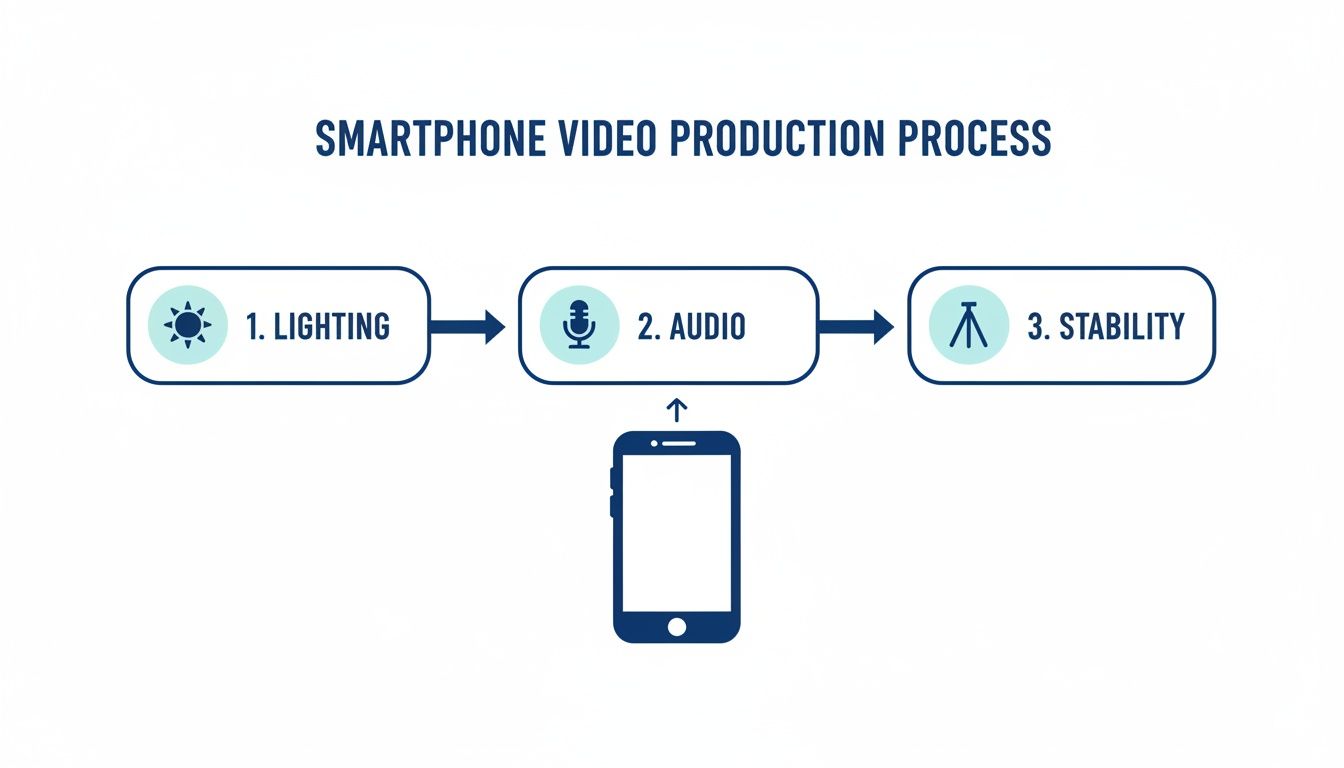
Get these right, and the editing process becomes infinitely easier and more effective.
Weaving In B-Roll To Illustrate Your Points
B-roll is any supplemental footage you use to visually illustrate what the speaker is talking about. It is your secret weapon against boring "talking head" videos and makes abstract legal concepts feel real.
For example, if a personal injury lawyer is explaining the importance of documenting a car accident scene, you could cut away to B-roll clips of:
- A close-up of a smartphone taking a photo of vehicle damage.
- Footage of a busy intersection.
- A shot of an insurance claim form.
This simple technique breaks the monotony and helps viewers visualize—and remember—the critical information you’re sharing. You can use high-quality stock video or even shoot simple clips around your own office for a more authentic feel.
The Critical Role Of On-Screen Text and Captions
Assume every video you post will be watched with the sound off. Seriously. Research shows that up to 85% of videos on platforms like Facebook are viewed in silence. This makes on-screen text and captions completely non-negotiable.
On-screen text (or "text overlays") should be used to highlight your key takeaways. Pull out important stats, legal deadlines, or complex terms and put them on the screen in bold, clear text.
Captions, on the other hand, are a word-for-word transcript of everything you say. They are absolutely essential for two reasons:
- Accessibility: Captions make your content accessible to viewers who are deaf or hard of hearing, which is a key part of ADA compliance.
- Silent Viewing: They let everyone else understand your message without ever turning on their audio.
Most video editing apps today, like CapCut or Descript, can auto-generate captions in seconds. You’ll need to double-check them for accuracy—especially with legal jargon—but this feature is a massive time-saver. It’s the final touch that ensures your message can reach the widest possible audience.
Using AI Tools to Streamline Your Video Workflow
In any law firm, time is the one asset you can't get back. You understand efficiency, and that’s exactly what artificial intelligence brings to video editing. AI-powered tools aren't some far-off concept anymore; they are practical, accessible solutions that can slash your editing time from hours down to minutes.
This makes consistent video marketing an actual, achievable goal.
Imagine a busy employment lawyer recording five short videos on a Monday morning. The old way meant spending the rest of the day—or handing it off to someone else to spend their day—manually trimming clips, adding captions, and polishing the final product. With AI, the most tedious tasks get handled automatically. This isn't about replacing human judgment; it's about augmenting your capacity to get things done.
The shift is already happening. A whopping 63% of video marketers now use AI for creation or editing. This isn't just a trend; it's proof that these tools are mature enough to deliver real results, like auto-captions and scene polishing that save hours of manual work. The impact is clear on platforms like Instagram (61% success rate) and LinkedIn (59%), where professionally polished content wins.
Better efficiency leads to a higher ROI, with 84% of marketers reporting direct sales increases from video. This allows firms to post more consistently and truly connect with their local audiences.
Automate Tedious Tasks and Reclaim Your Time
For most firms, the biggest hurdle to video is the sheer time commitment. AI tackles this problem head-on by automating the most repetitive and draining parts of the editing workflow.
Think about what really eats up the clock:
- Transcription and Captioning: Manually typing out captions is a soul-crushing task. AI tools like Descript or CapCut generate highly accurate transcriptions in seconds—a critical step for ADA compliance and for viewers watching with the sound off.
- Removing Pauses and Filler Words: AI can automatically detect and snip out awkward silences, "ums," and "ahs." The result is a much tighter, more professional video without you having to hunt for every little mistake.
- Audio Enhancement: Is the office HVAC system humming in the background? Many AI tools have a one-click "studio sound" feature that cleans up your audio, making you sound like you recorded in a professional booth.
By letting AI handle these mechanical tasks, you free up your team to focus on what really matters—planning the next series of client-focused videos or engaging with your audience—instead of getting bogged down in the editing weeds.
Smart Editing Features That Elevate Your Content
Beyond just saving time, AI offers smart features that actually improve the quality and impact of your videos. These tools act like a creative partner, analyzing your content and suggesting edits that a non-professional might not even think of.
For instance, some platforms can suggest dynamic cuts based on the rhythm of your speech. Others can identify the most visually engaging parts of a clip to use as a short, punchy teaser for social media. This analytical approach helps structure your videos to hold a viewer's notoriously short attention span.
For a deeper dive into what's possible, this guide on how to create AI-generated videos for social media offers some advanced strategies.
These AI-driven enhancements work hand-in-hand with your firm's other marketing efforts. It's the same data-first approach behind successful campaigns that use AI-powered Google Ads and SEO to attract the right kind of clients. You're simply optimizing your video content for maximum impact.
By embracing these tools, your law firm can produce a consistent stream of high-quality, professional video content without needing a dedicated production team. It’s all about working smarter, not harder, to build your brand and connect with your community.
Adding the Final Touches: Branding and Compliance

Alright, your video is cut, paced, and captioned. You're almost there, but the last 10% of the work is what separates a decent clip from a professional marketing asset for your law firm.
These final touches are where you stamp your authority on the content, reinforce your brand, and most importantly, make sure you're meeting critical ethical and accessibility standards.
It's a common mistake to rush this part, but skipping it can undo all your hard work. A polished video with no brand identity is forgettable. One without a call-to-action is a wasted opportunity. And a video that ignores compliance can create serious headaches you don't need.
Infuse Your Brand Identity
Your videos need to be instantly recognizable as yours, even if someone shares them or stumbles upon them out of context. This goes way beyond just slapping your logo on at the very end.
- Logo Placement: Add a small, clean version of your firm’s logo to one of the corners. It should stay there for most of the video. This constant, subtle reinforcement works wonders for brand recall.
- Brand Colors and Fonts: Any text, graphics, or lower thirds you use should pull directly from your firm’s established brand guide. This creates a cohesive, professional look that matches your website and other materials.
- Standardized Intro/Outro: We're talking a quick 3-5 second branded animation. Your intro can be simple, but the outro (or "end card") is key. It should clearly display your firm's name, logo, website, and the all-important call-to-action.
Drive Action with a Clear CTA
Every single video needs a job to do. What do you want the viewer to do next? Don't leave them guessing—tell them, directly and clearly.
Your call-to-action (CTA) should be both spoken and shown. A personal injury attorney might say, "If you've been injured, call us for a free consultation," while the text "Free Consultation" and your phone number pop up on the screen.
A great video educates and builds trust, but an effective video converts that trust into a tangible action. A clear, compelling CTA is the bridge between viewer engagement and a potential client consultation.
Ensure Accessibility and Ethical Compliance
For law firms, compliance isn't a "nice-to-have." It's mandatory. Your video editing for social media has to account for both accessibility for every user and the strict ethical rules governing our profession.
First, ADA (Americans with Disabilities Act) compliance is non-negotiable. As we covered, accurate captions are a must for viewers who are deaf or hard of hearing. But also think about your on-screen text—is it large enough? Does it have enough color contrast to be legible for someone with a visual impairment?
Second, you have to navigate the maze of legal advertising ethics. The rules vary from state to state, but a few basics are nearly universal:
- Attorney Advertising Disclaimers: Most states require a disclaimer, something like "This is an attorney advertisement." You can often place this discreetly in the video's description or as small text on your branded outro.
- No Guarantees of Outcome: This is a big one. You absolutely cannot promise results. Avoid any language that sounds like a guarantee, such as "We'll win your case" or "We promise the maximum settlement."
- Clarity on Specialization: Be extremely careful with words like "expert" or "specialist" unless you hold an official certification from your state bar that allows you to use them.
These rules can get complicated fast. For a deeper dive, you can explore our guide on navigating the guide to ethical attorney advertising. Taking these final steps ensures your video isn't just effective, but also responsible and professional.
Your Top Video Editing Questions, Answered
Once you start diving into video for social media, a few common questions always pop up. Let's get them out of the way so your firm can move forward with confidence.
What's the Best Video Editing Software for a Law Firm Just Starting Out?
If you have zero video editing experience, don't overcomplicate things. Your best bet is to start with incredibly user-friendly tools.
I always recommend platforms like CapCut or Descript for firms new to the game. They're built for speed and simplicity with intuitive interfaces, automatic caption generation, and simple drag-and-drop features. You can get a professional-looking result without needing a film degree.
How Often Should We Be Posting Videos?
Look, consistency will always beat frequency. Don't burn your team out trying to post daily.
A great starting point is to aim for 2-3 high-quality videos per week. This is a realistic rhythm that keeps your firm visible to your audience without letting the quality or compliance of your content slip. Once you nail down your workflow, you can always ramp it up.
The goal is to build a reliable presence, not to chase a quota. A sustainable posting schedule is what creates lasting impact and authority.
Can I Just Use a Popular Song in My Video?
Absolutely not. Using popular, copyrighted music is one of the fastest ways to get your content taken down or your account hit with a penalty. It's just not worth the risk.
Instead, stick to royalty-free music. You can find massive libraries of commercially-safe audio on services like Epidemic Sound or Artlist. Most of the good video editing apps even have their own built-in libraries of music you can use without worry.
Ready to turn your videos into a real client-generation machine? Case Quota builds social media and video marketing strategies that actually deliver cases for law firms. See how we do it at https://casequota.com.