

The Americans with Disabilities Act (ADA) doesn't spell out specific rules for websites, which can be confusing. The law was written before the internet was a part of daily life. So where do the requirements come from? U.S. courts have consistently filled in the blanks, pointing to one clear standard: the Web Content Accessibility Guidelines (WCAG) 2.1 AA.
This is the benchmark for making commercial websites—which the law considers ‘places of public accommodation’—legally accessible to everyone, including users with disabilities.
Why ADA Website Compliance Is Not Optional
Even though the ADA was passed back in 1990, its core purpose translates directly to the digital age. Courts have repeatedly decided that a commercial website is the modern equivalent of a physical storefront. An inaccessible website is, in the eyes of the law, no different from a shop with stairs but no ramp. It shuts the door on people with disabilities.
For law firms, ignoring these digital standards is no longer a viable option. Non-compliance is an open invitation for demand letters and costly lawsuits. But the conversation is evolving beyond just avoiding risk. Smart firms now see that following ada compliant website requirements is a powerful business advantage.
The Scope of the Accessibility Problem
The gap between legal expectations and online reality is staggering. As we head into 2025, a mere 4% of websites are estimated to actually meet full ADA compliance standards. This leaves a vast 96% of the internet riddled with accessibility barriers.
It gets worse. Research from Utah State University's Web AIM Million Project found the average homepage has 50 distinct accessibility errors. These aren't minor mistakes; they're violations of the very WCAG 2.1 AA standards that define legal compliance. You can learn more about this from Accessibility.works' breakdown of current website compliance standards.
This isn't just about technicalities. It’s a human issue that impacts millions who depend on assistive technologies to navigate the web.
The legal landscape is only getting stricter. In April 2024, the Department of Justice updated ADA Title II, mandating WCAG 2.1 AA compliance for all state and local government websites and digital content. This move signals a clear direction for future enforcement in the private sector.
More Than Just a Legal Obligation
If you're only looking at accessibility through a legal lens, you're missing the bigger picture. Embracing digital inclusion isn't just about checking a box; it offers real benefits that directly support your firm's growth. The simple truth is that an accessible website is a more usable website for everyone.
Here are a few key advantages of getting it right:
- Expanded Market Reach: You open your doors to millions of potential clients with disabilities, not to mention an aging population that often runs into similar digital roadblocks.
- Enhanced Brand Reputation: Showing a real commitment to inclusion builds trust and demonstrates a level of corporate responsibility that resonates with a much wider audience.
- Improved SEO Performance: So many accessibility best practices—like proper heading structures, descriptive links, and alt text for images—are exactly what search engines look for. Good accessibility is good SEO.
Ultimately, integrating accessibility is a strategic business decision. By prioritizing an SEO-first, ADA compliant web design, law firms can protect themselves from legal trouble while building a more effective and welcoming online presence for every single potential client.
Navigating the Surge in Website Accessibility Lawsuits
If you think of digital accessibility as a "nice-to-have" feature, it's time for a serious reality check. Ignoring your website's accessibility is no longer a hypothetical risk—it’s a direct and growing legal threat with severe, real-world consequences.
Plaintiff law firms have become incredibly systematic in their approach. They're actively scanning the web for businesses with digital barriers, turning non-compliance into a surprisingly profitable litigation niche. The argument they bring to court is powerful and simple: an inaccessible website denies people with disabilities equal access to your services, which is a clear violation of their civil rights under the ADA.
The Numbers Don't Lie: Litigation Is Exploding
This isn't a problem that's going away. It's accelerating at a staggering pace. In the first half of 2025 alone, a stunning 2,014 ADA website accessibility lawsuits were filed in federal courts.
That's a 37% increase over the same period in 2024. This trend sends a clear signal: plaintiffs are getting more aggressive, and most businesses are completely unprepared to defend themselves. You can dig into the specifics in the mid-year ADA lawsuit report from ecomback.com.
This surge isn’t happening at random. It’s a calculated effort focused on specific legal and business hotspots.
- Jurisdictional Hotspots: New York, Florida, and California are the epicenters, consistently leading the nation in lawsuit filings. If you do business online in these states, you're in a high-risk environment.
- Industry Targets: E-commerce, healthcare, and retail are prime targets because their websites are clearly defined as "places of public accommodation."
For law firms, this trend is a double-edged sword. Your own website is a potential liability, while your clients are also facing the same risk. A lawsuit doesn't just come with hefty legal bills; it can do serious damage to your firm's public image. Protecting against these claims is a core part of any solid strategy for reputation management for attorneys.
The False Promise of "Quick-Fix" Widgets
In a panic to address this legal pressure, many businesses grab for what looks like an easy solution: automated accessibility "overlays" or widgets. These tools promise instant ADA compliance with just a single line of code—a tempting offer compared to the work of a real accessibility audit.
But the data tells a much different, more cautionary tale.
Over 22% of businesses sued for ADA violations in the first half of 2025 had an accessibility widget installed on their website. This statistic is proof positive that these tools are not the legal shield they claim to be.
Why? Because courts and plaintiff's attorneys see these overlays for what they are: digital bandaids. They rarely fix the underlying code-level barriers and often interfere with the very assistive technologies they're supposed to help. Relying on them gives you a false sense of security while leaving your firm completely exposed.
Ultimately, this wave of litigation makes ADA compliance more than just a technical to-do list. It's a critical business decision—an investment in risk management, brand integrity, and inclusive client service that protects your firm from very real legal and reputational harm.
Decoding the Four Principles of WCAG 2.1 AA

While the legal side of web accessibility can feel a bit abstract, the technical standards are surprisingly straightforward. The Web Content Accessibility Guidelines (WCAG) are built on four common-sense principles, which you can easily remember with the acronym POUR. Every single rule and success criterion stems from these core ideas.
Think of POUR as the four pillars holding up a truly accessible website. If even one of them is weak, the whole experience can come crashing down for users with disabilities. Grasping these principles helps transform the complex ada compliant website requirements from a dry, technical checklist into a practical framework for building a more inclusive website.
The guidelines are structured around making your site Perceivable, Operable, Understandable, and Robust. Let's dig into what each of these really means for your law firm's site.
The Four Principles of WCAG 2.1 AA Explained
This table breaks down the four core principles of WCAG and provides practical examples of how they apply to website design and content.
| Principle | What It Means for Users | Practical Website Example |
|---|---|---|
| Perceivable | Users must be able to process the information presented. It can’t be invisible to all their senses. | Providing alternative text (alt text) for images so a screen reader can describe the image to a visually impaired user. |
| Operable | Users must be able to interact with the interface. They can’t be blocked from navigating or using a feature. | Making sure every link, button, and form field can be accessed and used with only a keyboard, no mouse required. |
| Understandable | The information and the way the site works must be clear and predictable. Confusion is a barrier. | Using consistent navigation across all pages so users don't have to re-learn where things are as they browse your site. |
| Robust | Content must be compatible with a wide variety of technologies, especially assistive devices like screen readers. | Writing clean, standard-compliant code (valid HTML) so that browsers and assistive tech can interpret it correctly now and in the future. |
These principles work together to create an experience that doesn't just look good, but functions for everyone, regardless of their abilities or the technology they use.
A Deeper Look at Each POUR Principle
Perceivable: Can Everyone Sense Your Content?
The first pillar, Perceivable, is the most fundamental. It simply means that users have to be able to perceive the information you're presenting—it can't be hidden from all of their senses. This is all about providing alternatives for content that someone might not be able to see or hear.
Imagine you’re describing a photo to a friend over the phone. You'd use words to paint a picture for them. That’s exactly what alternative text (alt text) does for an image. It’s a short, textual description that screen readers announce to visually impaired users, giving them the same context a sighted person gets at a glance.
Other crucial parts of being perceivable include:
- Captions for Videos: Just like alt text for images, captions are the text-based alternative for anyone who is deaf or hard of hearing, letting them follow along with spoken dialogue.
- Sufficient Color Contrast: Text that barely stands out from its background is tough for anyone to read, but it’s an absolute wall for users with low vision or color blindness. WCAG 2.1 AA has specific contrast ratios to ensure your text is always legible.
Operable: Can Everyone Use Your Website?
Next up is Operable. This principle is about ensuring that people can actually interact with every part of your site. If a user can't click a button, fill out your contact form, or navigate between pages, your site is effectively broken for them.
Think of keyboard-only navigation as the digital version of a wheelchair ramp. Most people might use the stairs (a mouse), but the ramp (keyboard accessibility) guarantees everyone can get in the building. Your website must be 100% functional using nothing but a keyboard.
A huge part of this is avoiding "keyboard traps." This is a frustrating dead-end where a user can navigate into a section with their keyboard but can't get back out, trapping them in a loop and making the rest of your site useless.
The Operable principle also covers things like:
- No Seizure Triggers: Avoiding content that flashes more than three times per second, which can induce seizures in people with photosensitive epilepsy.
- Sufficient Time: Giving users enough time to read and use content. If a form times out too quickly, someone with a motor or cognitive disability might never be able to complete it.
Understandable: Is Your Content Clear and Predictable?
The third pillar, Understandable, is all about clarity. Both the information itself and the way the site works have to be easy to comprehend. It’s not enough for users to be able to see and click on things; they need to understand what's happening.
Think about a dense legal contract filled with jargon versus a clearly written summary. The summary is more understandable for everyone, not just non-lawyers. The same logic applies to your website’s language, structure, and navigation.
Key aspects of an understandable website include:
- Consistent Navigation: Your main menu should be in the same place on every single page. This helps users build a mental map of your site, making it predictable and easy to use.
- Clear Form Labels: Every box in a contact form needs a clear label telling the user exactly what to enter. Don't make them guess.
- Simple Language: Writing in plain, direct language helps users with cognitive disabilities, but frankly, it helps every busy person trying to quickly find what they need. Many of these ideas overlap with our top law firm website design tips, because clarity always wins.
Robust: Will It Work with Their Technology?
Finally, we have Robust. This means your content must be built well enough to be interpreted reliably by all sorts of web browsers and, crucially, assistive technologies. This is the most "under the hood" principle, focused on writing clean, standards-compliant code.
Think of it like building with LEGOs. If you use standard, well-formed bricks (clean HTML), they fit together perfectly with any other standard set, like a screen reader. But if you use custom, misshapen pieces (messy, non-standard code), they won't work with anything else.
This principle is about future-proofing your site. By using clean code and ensuring all interactive elements have the right names and roles defined, you guarantee assistive technologies can make sense of your site today and as technology evolves tomorrow. This solid technical foundation is what allows the other three principles to work properly.
Your Essential ADA Compliance Checklist
Knowing the principles is one thing, but putting them into practice is where the rubber meets the road. This checklist is your starting point for a practical self-assessment. It’s designed to help you spot the most common and critical accessibility issues that tend to catch the eye of plaintiffs' attorneys.
Think of this less as a full-blown technical audit and more as a first-pass inspection. Running through these items will quickly highlight your website's most glaring weak spots. We’ve broken it down into a few key areas to keep it simple.
Visuals and Core Content
The text and images on your site are the bedrock of the user experience. If a potential client can't even perceive this fundamental information, everything else is pointless. These checks make sure your visual content is accessible to everyone.
-
Provide Alternative Text for All Images: Every single image that conveys information needs descriptive alternative text (alt text). This is what screen readers announce to visually impaired users, giving them the context they'd otherwise miss. For purely decorative images, like abstract background patterns, use an empty alt attribute (
alt="") so screen readers know to just skip over them. -
Check Color Contrast Ratios: Your text has to pop. If it blends into the background, it’s unreadable for many people. Use a free online color contrast checker to test your site's color palette. The WCAG 2.1 AA standard—the one courts look to—demands a contrast ratio of at least 4.5:1 for normal text and 3:1 for large text (18pt or 14pt bold).
-
Ensure Information Isn't Conveyed by Color Alone: This is a classic mistake. Never use color as the only way to communicate something important. If you mark required form fields only by turning them red, a color-blind user has no idea which ones are mandatory. Always add a secondary indicator, like an asterisk or a text label.
Site Structure and Navigation
A logical, predictable site structure is the digital equivalent of clear signage in a physical building. If a user gets lost trying to navigate your website, they can't find your services or contact information. This is one of the most fundamental ada compliant website requirements.
Just as a law office needs clear hallways and labeled doors, a website needs a predictable navigation system. Without it, users with disabilities can get lost, frustrated, and ultimately leave without ever reaching their destination.
-
Confirm Full Keyboard Accessibility: This is completely non-negotiable. Put your mouse aside and try to navigate your entire website using only your keyboard. Can you get to every link, button, and form field using the Tab key (to move forward), Shift+Tab (to move back), and Enter (to select)? If not, your site is broken for a huge number of users.
-
Look for a Visible Focus Indicator: As you tab through the site, pay close attention. A clear visual outline or "focus ring" must appear around the element you’ve landed on. Without it, keyboard users are flying blind—they have no idea where they are on the page.
-
Verify Descriptive Link Text: Vague link text like "Click Here" or "Learn More" is a major accessibility failure. Link text needs to make sense on its own, clearly telling the user what will happen when they click. "Read more about our personal injury services" is infinitely better than a generic "Read More."
A well-structured site doesn't just help users with disabilities; it improves the experience for everyone, which is a cornerstone of effective website optimization for law firms.
Interactive Elements and Forms
Your contact forms, buttons, and other interactive features are how potential clients actually reach out to you. If these are unusable for people with disabilities, you are literally turning away potential cases at your digital front door.
-
Ensure All Form Fields Have Labels: Every single box on your forms—name, email, message—must have a visible and programmatically linked label. This tells a screen reader user exactly what information goes where. Placeholder text inside the box is not an acceptable substitute.
-
Check for Clear Error Messages: When someone makes a mistake on a form, the error needs to be announced clearly. The message should explain what’s wrong and how to fix it, like "Please enter a valid email address." The best practice is to automatically move the user’s focus directly to the field that needs correcting.
-
Verify That Media Can Be Controlled: Any video or audio on your site must have user controls. That means obvious buttons to play, pause, and stop. If any media starts playing automatically for more than three seconds, there absolutely must be a way for the user to shut it off.
Walking through this list gives you a solid baseline of your website’s current compliance health. More importantly, it gives you a clear, prioritized to-do list for making things right.
Auditing Your Site and Fixing Accessibility Issues
Knowing the law is one thing, but real compliance happens when you roll up your sleeves and get to work. This is where the rubber meets the road—auditing your website, finding the barriers, and creating a smart plan to knock them down. A good audit is like a structural inspection for a building; it finds the weak spots so you can fix them before the whole thing comes crashing down.
The best approach here isn't just about running some automated tool. It's a mix of technology and good old-fashioned human expertise. Automated scanners are great for a first pass, catching the obvious, widespread problems across your site. But they will always miss the nuanced issues that only a person trying to actually use your site will find. That's why manual testing, especially with assistive technologies like screen readers, is absolutely essential.
Creating a Practical Remediation Workflow
Staring down a full website remediation project can feel like a massive undertaking. The trick is to break it into a manageable workflow. Don't try to boil the ocean and fix everything at once. Focus on the changes that will make the biggest difference first. This not only makes the project feel less daunting but also clearly demonstrates a good-faith effort to get accessible, which can be a huge factor if you ever find yourself in a legal dispute.
Here’s a practical, step-by-step process:
- Combine Automated and Manual Testing: Kick things off with an automated scan to get a bird's-eye view of common errors. Then, have an accessibility pro come in and manually test the most critical paths a potential client would take on your site. This means navigating with just a keyboard, using a screen reader, and stress-testing every form and interactive feature.
- Prioritize High-Impact Fixes: Forget about tiny cosmetic issues on a blog post from five years ago. Put your energy where it counts: your homepage, contact page, practice area pages, and any intake form a potential client must use to contact you. Fixing these critical pathways first removes the biggest roadblocks for users.
- Document Everything: Keep a running log of your audit findings, the fixes you're implementing, and your timeline for getting it all done. This paper trail is priceless if you ever need to prove your commitment to compliance.
This structured process turns a complicated mess into a clear, actionable plan. It's a core part of how you can improve your law firm website, not just for legal reasons, but for a better user experience all around.
The Financial and Legal Stakes of Inaction
Kicking this can down the road carries very real financial risk, especially for small and mid-sized firms. In 2023, about 77% of ADA lawsuits targeted businesses with annual revenues under $25 million. This proves nobody is too small to be sued. With plaintiff firms now using automated tech to identify over 70% of the websites they target, filing these lawsuits has become incredibly efficient, driving a 23% spike in cases in early 2025 alone.
This isn't just a private sector problem, either. The Department of Justice has mandated that all state and local government websites and apps must conform to WCAG 2.1 AA by 2026. It’s a massive project expected to cost taxpayers tens of billions nationwide, signaling a clear, government-backed shift toward enforcing digital access as a fundamental legal standard.
Beyond the Audit: An Ongoing Commitment
Getting compliant isn't a one-and-done deal. Your website is a living thing—it changes every time you add a new blog post, update a service page, or add a new feature. To stay compliant for the long haul, you need a plan for ongoing monitoring and maintenance. A good user experience audit checklist can be an excellent resource for building this kind of sustainable process.
Finally, a crucial piece of your strategy is simply being transparent. Create and publish a public accessibility statement on your website. This document should do three things:
- Acknowledge your commitment to accessibility and state the standard you're aiming for (WCAG 2.1 AA).
- Briefly describe the steps you’ve taken and are continuing to take to improve your site.
- Provide a clear way for users with disabilities to contact you if they run into a problem.
This statement isn't just a legal formality. It's a public declaration of your firm's values and a practical way to get feedback, turning your compliance work into a virtuous cycle of constant improvement.
Common Questions About Website ADA Requirements
Diving into digital accessibility can feel like navigating a legal and technical maze. As things shift, it's natural to feel a bit lost about the right steps to take. This section is designed to give you clear, direct answers to the most common questions we hear from business owners about ADA compliant website requirements.
Think of this as your quick-reference guide. We’re cutting through the jargon to get right to the heart of what you need to know—from which standards actually matter to the real-world costs of compliance versus litigation. Our goal is to reinforce the key takeaways and help you make confident, informed decisions for your firm.
What Standard Do I Actually Need to Follow?
This is easily the most common question, and thankfully, the answer is refreshingly straightforward. While the ADA itself doesn't hand you a technical checklist for websites, U.S. courts and the Department of Justice (DOJ) have consistently pointed to one specific benchmark: the Web Content Accessibility Guidelines (WCAG) 2.1 Level AA.
This is the gold standard, the one that truly matters in the United States. If your website meets the WCAG 2.1 AA criteria, you are in a very strong position to defend against any accessibility-related legal action. Focusing on this specific standard eliminates all the guesswork and gives your team a clear, actionable target.
Can I Get Sued if I'm a Small Business?
Yes, absolutely. In fact, small and mid-sized businesses are the primary targets of ADA website lawsuits. The data is sobering: approximately 77% of these lawsuits are filed against companies with annual revenues under $25 million.
Plaintiff law firms often view smaller businesses as low-hanging fruit, assuming they don't have the resources or legal team to fight back. Under the ADA, any public-facing website can be considered a "place of public accommodation." No business is too small to be in the crosshairs, making this a critical issue for everyone, not just mega-corporations.
The path to compliance generally follows a clear, repeatable process.
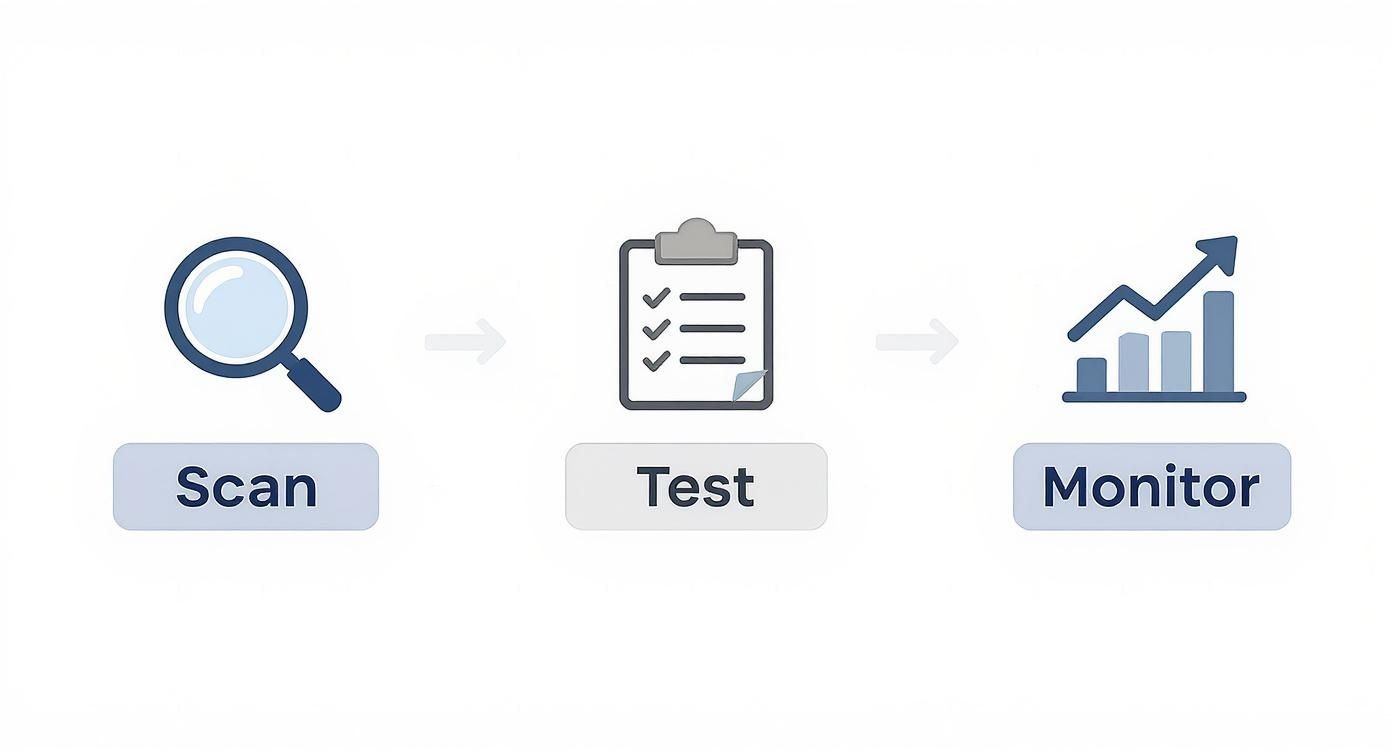
This simple Scan, Test, and Monitor workflow is the core of any sustainable compliance strategy. It takes you from initial discovery all the way to long-term maintenance.
Is My Website Grandfathered In if It's Old?
Unfortunately, no. There's no "grandfather clause" for website accessibility under the ADA. The law demands that places of public accommodation provide equal access, and that obligation applies to your website right now, regardless of when it was first launched.
In reality, an older website is far more likely to have major accessibility issues, as web standards have evolved dramatically. Believing an old site is exempt is one of the most dangerous—and costly—misconceptions a business owner can have.
How Much Does an Accessibility Audit Cost?
The price tag for a professional WCAG audit varies quite a bit, depending on the size and complexity of your website. A simple site for a small law firm will be on the lower end, while a massive e-commerce platform will naturally require a much deeper dive.
On average, you can expect a thorough WCAG 2.1 AA audit to range from $3,000 to over $30,000. While that might seem like a hefty investment, it's a drop in the bucket compared to settling a lawsuit. A settlement typically starts at $5,000 to $20,000, and that's before you pay your own attorney's fees and the mandatory cost of fixing the site anyway.
Are Accessibility Overlays a Viable Solution?
Automated accessibility widgets or "overlays" are often peddled as a cheap, one-click fix for ADA compliance. Let's be clear: they are not. These tools are notoriously ineffective and do not replace proper, code-level remediation. They frequently fail to fix the root problems and can even create new barriers for the very assistive technologies they claim to support.
Worse yet, using one can actually paint a target on your back. Plaintiff's attorneys know these widgets don't work. In fact, over 22% of businesses sued for accessibility violations had one of these overlays installed on their site. Investing in genuine, manual remediation isn't just the best path to compliance—it's the only reliable one.
At Case Quota, we specialize in building websites for law firms that are not only high-performing but also fully ADA compliant from the ground up. Protect your firm and welcome every potential client by visiting https://casequota.com to learn how we can help.